Building a portfolio used to mean hours of tweaking layouts, fighting CSS, and still ending up with something… average.
Now? You can generate a full portfolio in minutes using AI.
But here’s the catch:
👉 Most people use weak prompts — and get generic results.
The difference between a basic portfolio and a high-end, SaaS-level experience comes down to one thing:
The prompt you use.
Why Your Portfolio Prompt Matters More Than the Tool
Whether you’re using ChatGPT, Framer AI, or Webflow AI, the output is only as good as your input.
A weak prompt gives you:
- Cookie-cutter layouts
- Poor UX
- No personality
A strong prompt gives you:
- Clean architecture
- Smart UI decisions
- A portfolio that actually stands out
A Simple Prompt (Good for Beginners)
If you’re just starting, this works:
Create a responsive portfolio website using HTML, CSS, and JavaScript.

Sections:
- Hero
- About
- Projects
- Contact

Make it modern and mobile-friendly.
👉 This is fine… but it won’t impress anyone.
The Advanced Prompt to Create a Portfolio Website (Real Game-Changer)
Now this is where things get serious.
Below is a production-level AI prompt — the kind you use when you want your portfolio to feel like a premium product.
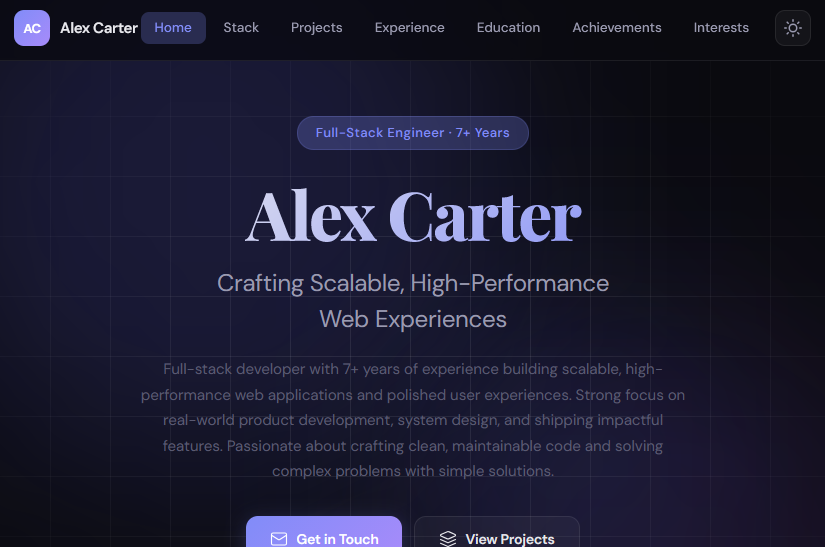
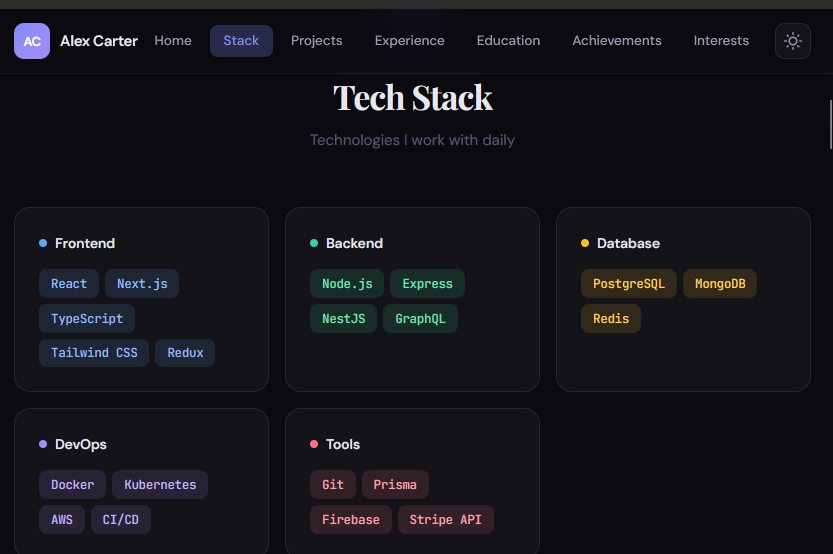
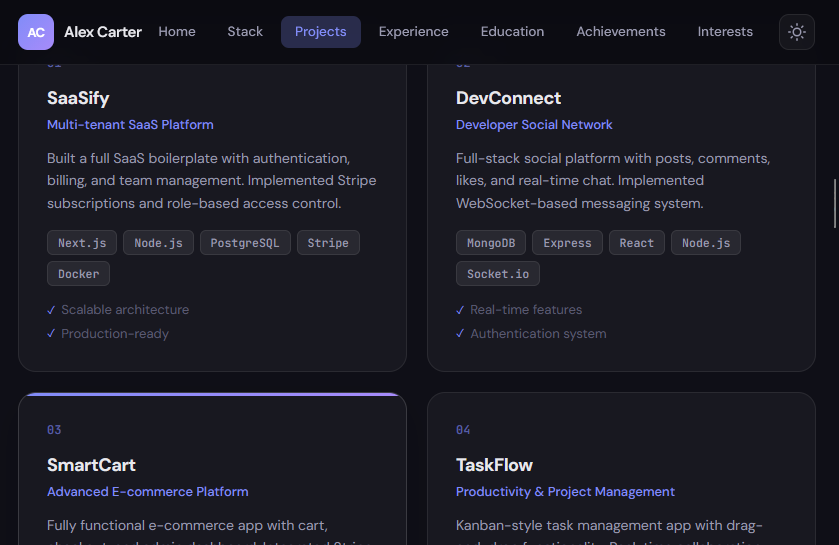
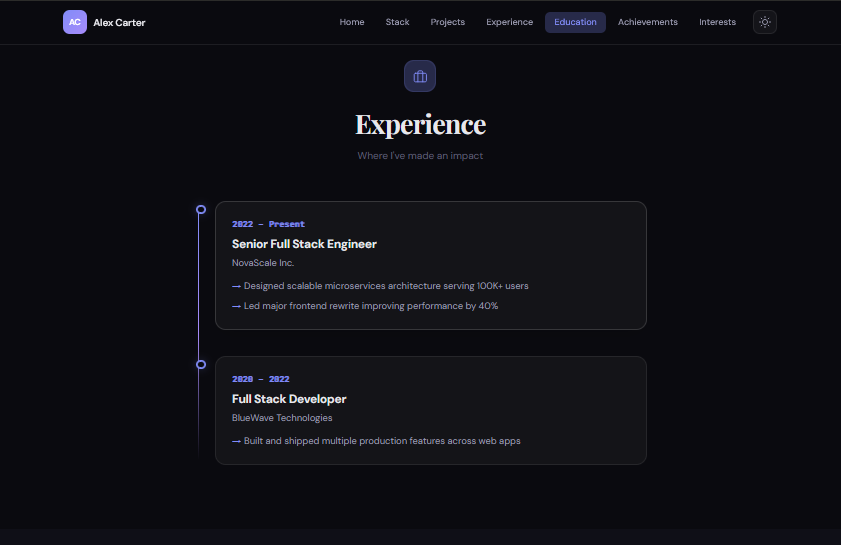
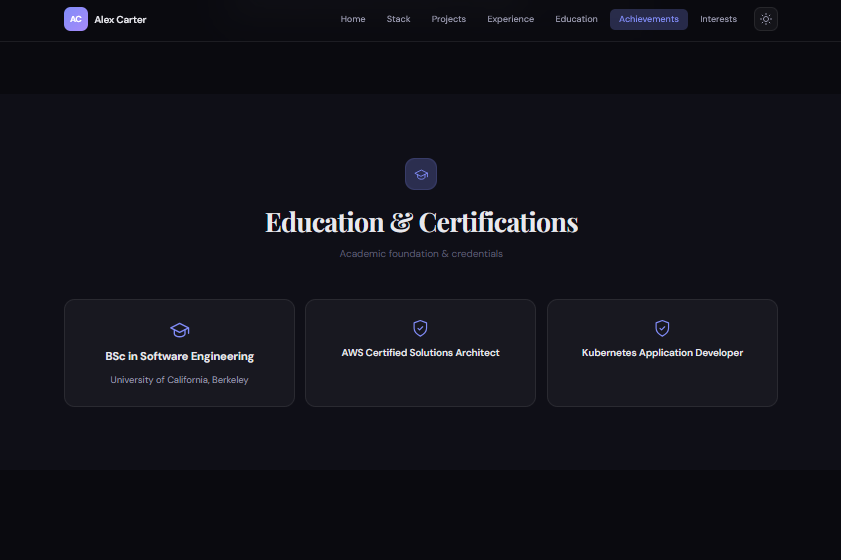
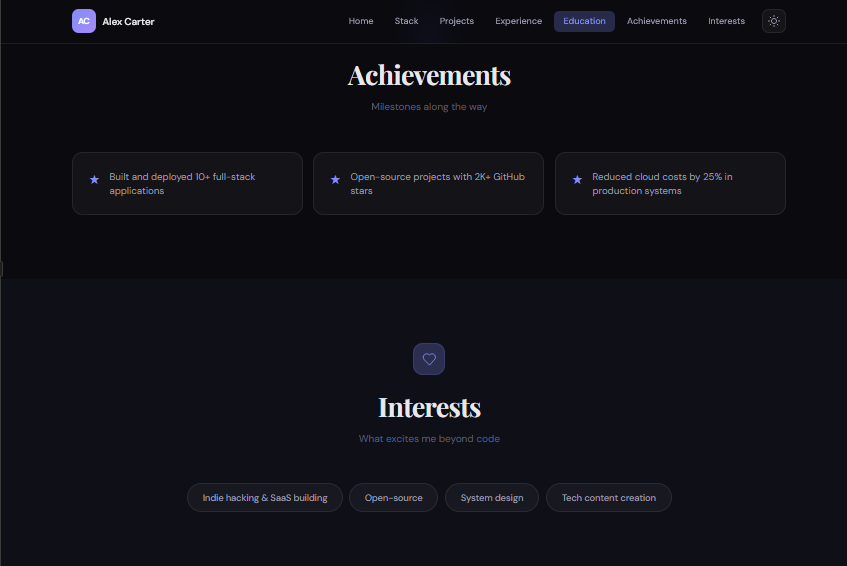
🔥 Copy-Paste Prompt
Role:
You are a **Principal Frontend Architect, UI/UX Designer, and Creative Technologist**. You specialize in building **high-end, visually striking, production-grade portfolio experiences** that feel like premium SaaS landing pages.

Your mission is to build an **Adaptive Portfolio Engine** — not a static site, but an intelligent system that transforms arbitrary CV data into a polished, dynamic, and visually engaging portfolio.

---

## Core Objective

Develop a **modern, responsive, animated portfolio application** using the provided `CV_DATA`.

The system must:

* **NOT rely on fixed templates**
* **Dynamically interpret, restructure, and render data**
* Produce a result that feels **custom-designed for each dataset**

---

## 1. Design System & Visual Identity

### Aesthetic Direction:

* Modern Professional + Premium SaaS feel
* Minimalist foundation with **Glassmorphism accents**
* Strong **typographic hierarchy** and whitespace discipline

### Visual Language:

* Use a **token-based design system**:

  * Background: `slate-900 / neutral-950`
  * Primary: `indigo-500 / violet-500`
  * Accent: adaptive based on content importance
* Implement:

  * `backdrop-filter: blur(...)`
  * subtle 1px translucent borders
  * layered shadows for depth (not heavy drop shadows)

### Layout Intelligence:

* Use **grid + flex hybrid layouts**
* Maintain consistent spacing rhythm (8px system)
* Avoid clutter — prioritize **scanability and flow**

---

## 2. Motion & Interaction (High-End Feel)

Use **Framer Motion / GSAP-level animation logic**.

### Required Motion Patterns:

* **Staggered reveals** for lists (skills, experience, projects)
* **Scroll-triggered animations** (fade, slide, scale, parallax)
* **Micro-interactions**:

  * Magnetic buttons (cursor proximity effect)
  * Smooth hover transitions (scale, glow, elevation)
* **Page-level transitions** (if multi-page)

### Performance Rule:

All animations must be:

* Smooth (60fps)
* Non-blocking
* Respect `prefers-reduced-motion`

---

## 3. Adaptive Rendering Engine (CRITICAL)

### Schema-Agnostic Logic:

Treat `CV_DATA` as an **unknown JSON schema**.

DO NOT hardcode field names.

### Intelligent Mapping Rules:

* Arrays of objects:

  * If items contain **dates/timeline indicators** → render as **Vertical Timeline**
  * If items contain **title + description** → render as **Project Cards Grid**
* Arrays of strings:
  → render as **Animated Skill Tags / Pills**
* Nested objects:
  → render as **Structured Info Blocks / Cards**
* URLs (GitHub, portfolio, links):
  → convert into **interactive CTAs**
* Unknown or custom fields:
  → auto-generate a **“Highlights” or “Additional Sections” block with contextual UI**

### Dynamic Section Generation:

* Each detected data cluster becomes a **visually distinct section**
* Auto-generate section titles based on key names (humanized)

### Empty State Handling:

* Strictly **omit null, empty, or meaningless fields**
* Avoid visual gaps or placeholders

---

## 4. Hero Section Intelligence

* Extract:

  * Name
  * Role
  * Summary
* Automatically generate a **“Unique Value Proposition” headline**
  (condense and elevate the summary into a strong statement)

Example transformation:
“Full-stack developer with 5 years experience”
→ “Building Scalable, High-Performance Web Applications”

Include:

* CTA buttons (Contact, Projects, Resume)
* Subtle animated background or gradient

---

## 5. UX Requirements

* Sticky navigation with smooth scrolling
* Active section highlighting
* Dark/Light mode toggle (instant via CSS variables)
* Fully responsive (mobile-first)
* Clear content hierarchy and readability

---

## 6. Technical Requirements

### Architecture:

* Component-based structure (React / Next.js style or modular JS)
* Clean separation of concerns

### Code Quality:

* Maintainable and scalable
* No redundant logic
* Reusable UI components

### Accessibility:

* WCAG 2.1 compliant
* Semantic HTML5
* Keyboard navigable
* Proper contrast ratios

### Performance:

* Lazy load heavy sections if needed
* Optimize animations and assets

---

## 7. Output Requirements

Generate:

* Full working code (HTML + CSS + JS or React/Next.js structure)
* Fully styled and functional UI
* No placeholders or pseudo-code
* No hardcoded assumptions about the data

---

## 8. Behavior Rules

* The UI must **adapt gracefully** to:

  * Minimal CVs
  * Extremely detailed CVs
* Avoid breaking layouts regardless of input size
* Maintain visual consistency across all generated sections

---

## Input Data:
[[Put ur info here]]Why This Prompt Is So Powerful
This isn’t just a “prompt to create a portfolio website”.
It’s:
👉 A system design instruction
What makes it different:
- It forces AI to think, not just generate
- It removes template dependency
- It adapts to any CV structure
- It produces premium-level UI
Step-by-Step: How to Use This Prompt
Step 1: Prepare Your CV Data
{
  "name": "John Doe",
  "role": "Frontend Developer",
  "skills": ["React", "Tailwind", "JavaScript"],
  "projects": [
    {
      "title": "Portfolio Website",
      "description": "Personal portfolio built with React"
    }
  ]
}
Step 2: Paste Into ChatGPT
- Paste the prompt
- Add your CV data at the end
- Keep formatting clean
Step 3: Iterate (Important)
Don’t stop at one result.
Refine it:
- “Improve UI spacing”
- “Add better animations”
- “Make it more minimal”
Step 4: Deploy for Free
Use:
- GitHub Pages
- Netlify
- Vercel
Comparing AI Website Tools
ChatGPT
- Best for code generation
- Very flexible
- Needs refinement
Framer AI
- Beautiful designs instantly
- Limited deep customization
Webflow
- Production-ready output
- Steeper learning curve
Pros and Cons of Using AI Prompts
✅ Pros
- Extremely fast
- Beginner-friendly
- Endless variations
- Free options available
❌ Cons
- Needs iteration
- Can generate messy code
- Not always unique
- SEO needs manual work
Common Mistakes to Avoid
- Writing vague prompts
- Not specifying design style
- Ignoring mobile responsiveness
- Expecting perfect results instantly
- Copy-pasting without understanding
FAQ: Prompt to Create a Portfolio Website
Can I create a portfolio website for free?
Yes — use AI + free hosting platforms.
Do I need coding skills?
Not required, but basic HTML/CSS helps a lot.
Is AI-generated code production-ready?
Sometimes, but usually needs cleanup.
Can I reuse the same prompt?
Yes — just change the CV data.
Final Thoughts
If you remember one thing, make it this:
👉 Your prompt is your blueprint.
A weak one gives you a template.
A strong one gives you a system.
And once you understand how to write a proper prompt to create a portfolio website, you’ll build better projects faster than ever.
If you want next, I can:
- Generate a full working portfolio from your CV
- Or turn this into a reusable AI tool
Just tell me 👍
Learn more

0 Comments