✨ Introduction
If you are planning to publish on Amazon Kindle Direct Publishing (KDP), your book cover is the most important part of your entire book.
A good cover can:
- Increase clicks 📈
- Improve sales 💰
- Make your book look professional instantly
A bad cover can make your book invisible — even if the content is amazing.
The good news?
You no longer need Photoshop, design skills, or expensive freelancers.
Today, with AI tools like ChatGPT, Gemini, and Canva AI, you can generate professional KDP book covers in minutes using simple prompts.
This guide will show you exactly how to use a kdp cover template generator free workflow to create high-quality 8.5×8.5 children’s book covers ready for Amazon.
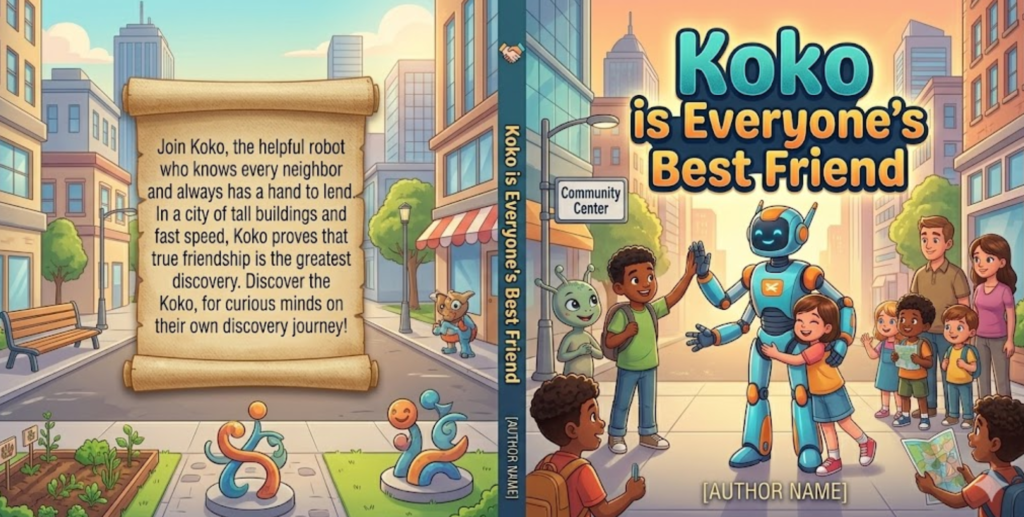
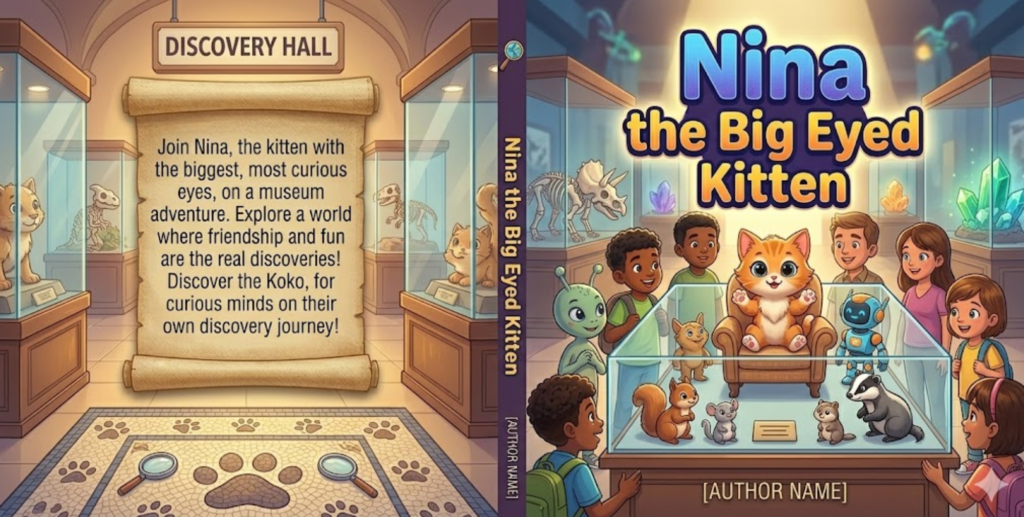
🧠 Step-by-Step Guide: How to Create a KDP Cover
🟢 Step 1: Choose Your Children’s Book Idea
Pick a simple concept that works well on Amazon KDP:
- 🐶 Animals learning books
- 🚀 Space adventures
- 😄 Emotions & feelings
- 🔬 Science for kids
- 🏫 School stories
- 🌊 Underwater worlds
- 🏰 Fantasy castles
👉 Keep it simple. Simple sells better.
🟢 Step 2: Use AI Cover Prompts
You will use a structured prompt to generate your cover idea.
You can paste it into:
- ChatGPT (for prompt creation)
- Gemini (for image generation)
- Canva AI (for direct design)
🟢 Step 3: Generate Multiple Covers
Never accept the first result.
Generate 3–10 versions and pick the best one.
🟢 Step 4: Edit Title & Author
Replace:
[BOOK TITLE]→ your book name[AUTHOR NAME]→ your pen name
🟢 Step 5: Export for Amazon KDP
Make sure your final cover is:
- 📏 8.5 x 8.5 inches
- 📦 Full wrap (front + spine + back)
- 🖨️ 300 DPI print quality
- 📄 KDP-ready format
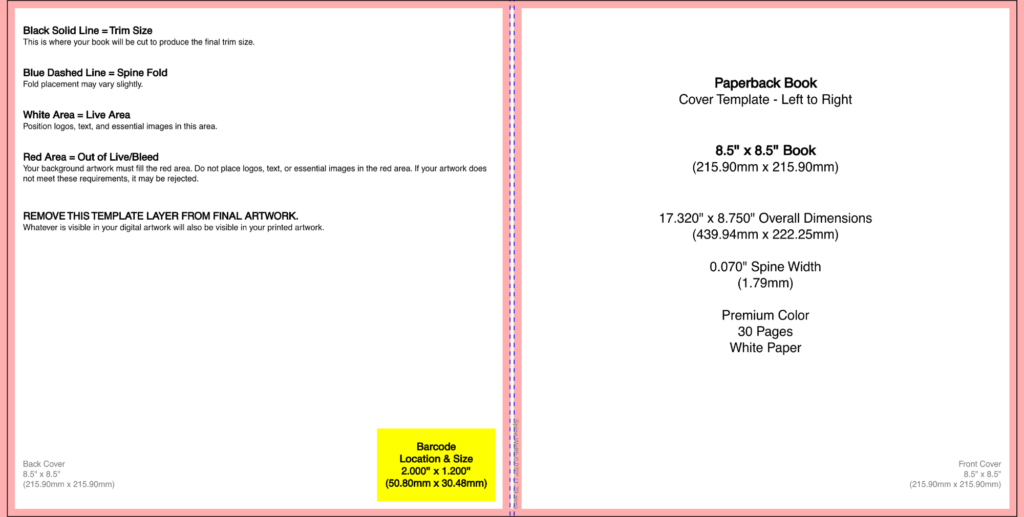
🎨 MASTER KDP FULL-WRAP CHILDREN’S BOOK COVER PROMPT
(👉 COPY EXACTLY THIS)
━━━━━━━━━━━━━━━━━━━━━━━━━━━━━━━━━━━━━━
🚀 MASTER FULL-WRAP CHILDREN’S BOOK COVER PROMPT
━━━━━━━━━━━━━━━━━━━━━━━━━━━━━━━━━━━━━━━━

A stunning full-wrap children’s paperback book cover designed for 8.5 x 8.5 inch trim size, including full bleed (front cover, spine, back cover). Print-ready, no template overlays, no guide lines, no barcode box.

Base concept:
[YOUR BOOK TITLE]

━━━━━━━━━━━━━━━━━━━━━━━━━━━━━━━━━━━━━━
❗ CORE RULE (VERY IMPORTANT)
━━━━━━━━━━━━━━━━━━━━━━━━━━━━━━━━━━━━━━
Do NOT default to forest, woodland, trees, magical woods, or generic nature scenes.

Instead, generate a setting that strictly matches the theme of the title.

Allowed environments:
- School / classroom / library (education)
- Science lab / futuristic lab / experiments (science)
- Space / galaxies / planets / astronauts (space)
- City / street / urban world (real life)
- Home / bedroom / family setting (emotional stories)
- Sports field / stadium / gym (sports)
- Underwater ocean world (marine adventure)
- Castle / fantasy kingdom (fantasy)
- Abstract symbolic world (math, logic, concepts)
- Museum / discovery / exploration spaces

━━━━━━━━━━━━━━━━━━━━━━━━━━━━━━━━━━━━━━
🎨 ART STYLE
━━━━━━━━━━━━━━━━━━━━━━━━━━━━━━━━━━━━━━
Premium modern children’s book illustration:
- Vibrant but balanced colors
- Semi-3D or Pixar-inspired style
- Clean composition with clear focal point
- Expressive, friendly characters (if needed)
- High-end publishing finish

━━━━━━━━━━━━━━━━━━━━━━━━━━━━━━━━━━━━━━
📘 FRONT COVER
━━━━━━━━━━━━━━━━━━━━━━━━━━━━━━━━━━━━━━
- Title: [YOUR BOOK TITLE] placed prominently (top or center)
- Bold, playful, highly readable typography
- Subtle depth (shadow/glow allowed)
- Main illustration clearly represents the theme
- No clutter behind title text

━━━━━━━━━━━━━━━━━━━━━━━━━━━━━━━━━━━━━━
✍️ AUTHOR NAME
━━━━━━━━━━━━━━━━━━━━━━━━━━━━━━━━━━━━━━
[AUTHOR NAME] placed at bottom of front cover
- Same style family as title
- Smaller but elegant and readable
- Center aligned

━━━━━━━━━━━━━━━━━━━━━━━━━━━━━━━━━━━━━━
📚 SPINE
━━━━━━━━━━━━━━━━━━━━━━━━━━━━━━━━━━━━━━
- Small thematic icon
- Clean and minimal professional layout

━━━━━━━━━━━━━━━━━━━━━━━━━━━━━━━━━━━━━━
📖 BACK COVER
━━━━━━━━━━━━━━━━━━━━━━━━━━━━━━━━━━━━━━
- Same world/theme, simplified composition
- Space for description:
  [BOOK DESCRIPTION AREA]
- Clean, professional publishing layout
- No UI elements or design grids visible

━━━━━━━━━━━━━━━━━━━━━━━━━━━━━━━━━━━━━━
🎯 FINAL GOAL
━━━━━━━━━━━━━━━━━━━━━━━━━━━━━━━━━━━━━━
Must look like a real commercial bestseller children’s book cover:
- Unique to the title
- Theme-specific (no generic visuals)
- Emotionally engaging for children
- Amazon KDP print-ready quality
━━━━━━━━━━━━━━━━━━━━━━━━━━━━━━━━━━━━━━
🖌️ CANVA AI PROMPT (IMPORTANT)
Use this inside Canva AI or Magic Design:
Children’s book cover illustration, square composition.

Create a bright modern 2D children’s illustration for a book cover.

Include EXACT visible text on the image:
“[BOOK TITLE]” as the main title at the top of the cover
“[AUTHOR NAME]” as the author name at the bottom

Make sure the text is clearly readable, correctly spelled, and centered.

Scene: match the theme using classroom, space, city, underwater world, home, castle, or science lab.

Clean layout, simple shapes, soft lighting, professional children’s publishing style.

No extra text.
📚 Why This Works (KDP Strategy Insight)
Most beginners fail because they:
- Use generic “forest Pixar-style” prompts ❌
- Don’t control layout ❌
- Don’t design for KDP print size ❌
This system fixes that by:
✔ Forcing full wrap structure
✔ Preventing generic AI outputs
✔ Ensuring KDP-ready format
✔ Optimizing for Amazon thumbnails
🧰 Helpful Tools (SEO Keywords Explained)
If you are searching for tools, here’s what people use:
- kdp cover template generator free → AI prompt-based system (like this guide)
- KDP cover calculator / Bookow KDP cover calculator → calculates spine width
- Amazon KDP book sizes template → official Amazon formatting guide
- KDP cover template PDF download → downloadable print templates
- KDP cover template for Canva → Canva-based design workflow
👉 These tools help you format your book correctly for Amazon publishing.
❓ FAQ
🟡 Can ChatGPT design a book cover?
ChatGPT does not directly generate images, but it can create highly detailed prompts that produce professional AI book covers using tools like Gemini or Canva AI.
🟡 Does KDP have a book cover template?
Yes. Amazon provides templates, but most creators prefer using a KDP cover calculator for accurate spine and wrap sizing.
🟡 How to download KDP cover template?
You can:
- Download directly from Amazon KDP
- Use online tools like Bookow
- Or generate using AI prompt systems
🟡 What size is a KDP cover?
For this guide:
📏 8.5 x 8.5 inches (square children’s paperback book)
🟡 Can I use Canva for KDP covers?
Yes. Canva is one of the easiest tools for beginners and works perfectly with a KDP cover template for Canva workflow.
🚀 Conclusion
Now you have a complete system to create professional Amazon KDP children’s book covers using AI.
No design skills needed.
No Photoshop needed.
No expensive tools needed.
Just:
👉 Copy the prompt
👉 Paste into AI tools
👉 Generate multiple covers
👉 Publish on Amazon KDP
This is the easiest way to build a low-content or children’s book business using AI.
Learn more



0 Comments